
Post-Purchase Email Automation in Xperience by Kentico: A Step-by-Step Guide
A customer who just bought a new brewer from Dancing Goat is ready to use it, wants to get it right, and is receptive to help. That window doesn't stay open long. This article walks through everything you need to build a post-purchase email sequence that reaches them while it matters, using a custom contact field to deliver the right content for the specific product they bought.
A marketer can build this end-to-end with access to a few Xperience by Kentico features and a small amount of upfront setup that a developer can put in place once.
This is the detailed article for Scenario 2 of Xperience Automations: You've Been Meaning to Explore Them. Here's What's Been Waiting. If you haven't read the main article yet, start there. It covers this scenario and four others, and gives you the full picture before diving in here.
This post was written for Xperience by Kentico v31.3.0. Please consult the documentation for feature or API changes when using a different version. Be sure to check the System Requirements in the product documentation.
Extend the Contact with a custom field
Customer data in Xperience by Kentico is modeled as contacts, and the Contact object can be extended through the administration UI, with no code required.
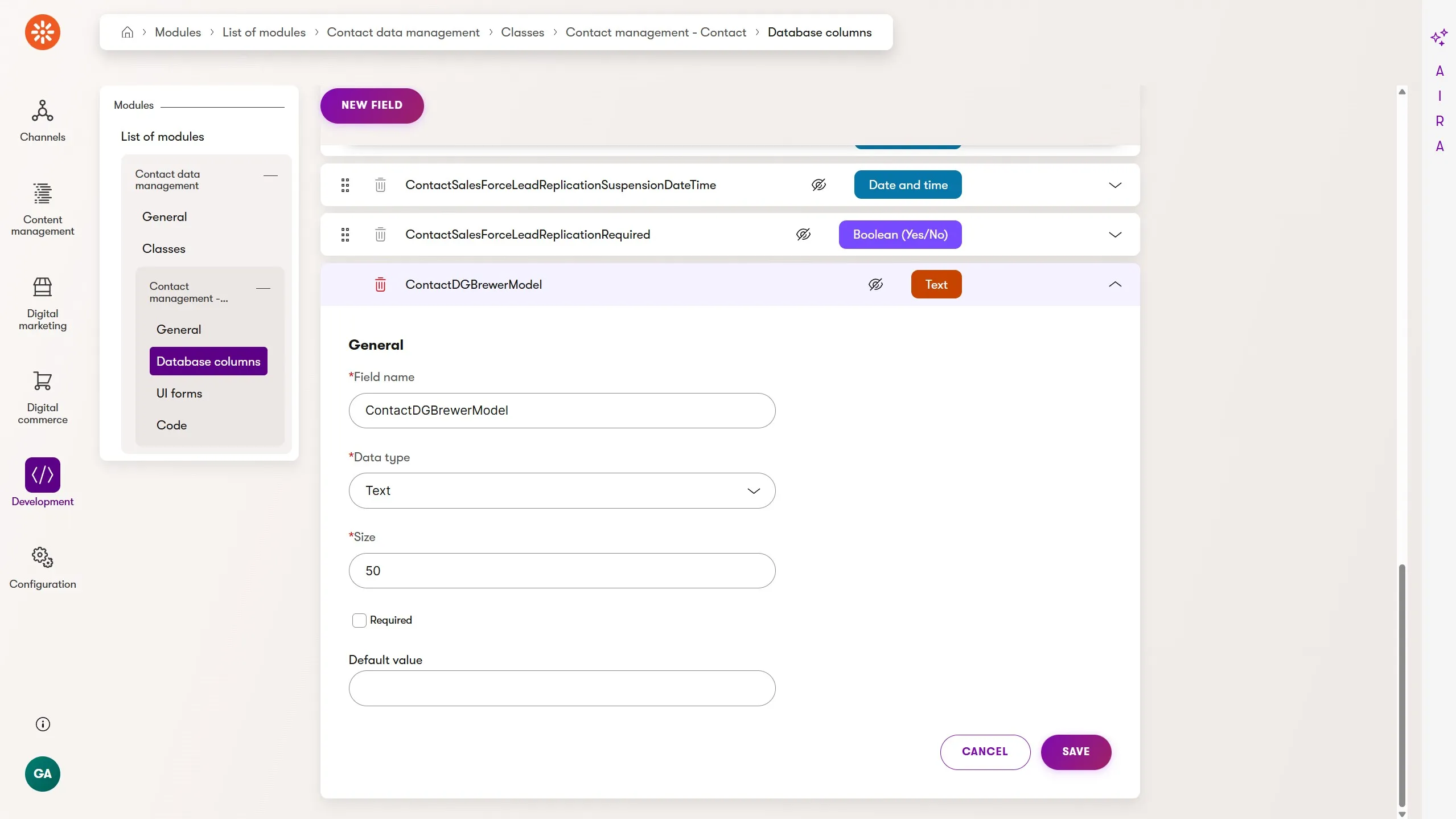
Add a new ContactDGBrewerModel text field to the Contact class. This gives you a place to store which brewer the customer purchased, making it available as a condition in any automation.
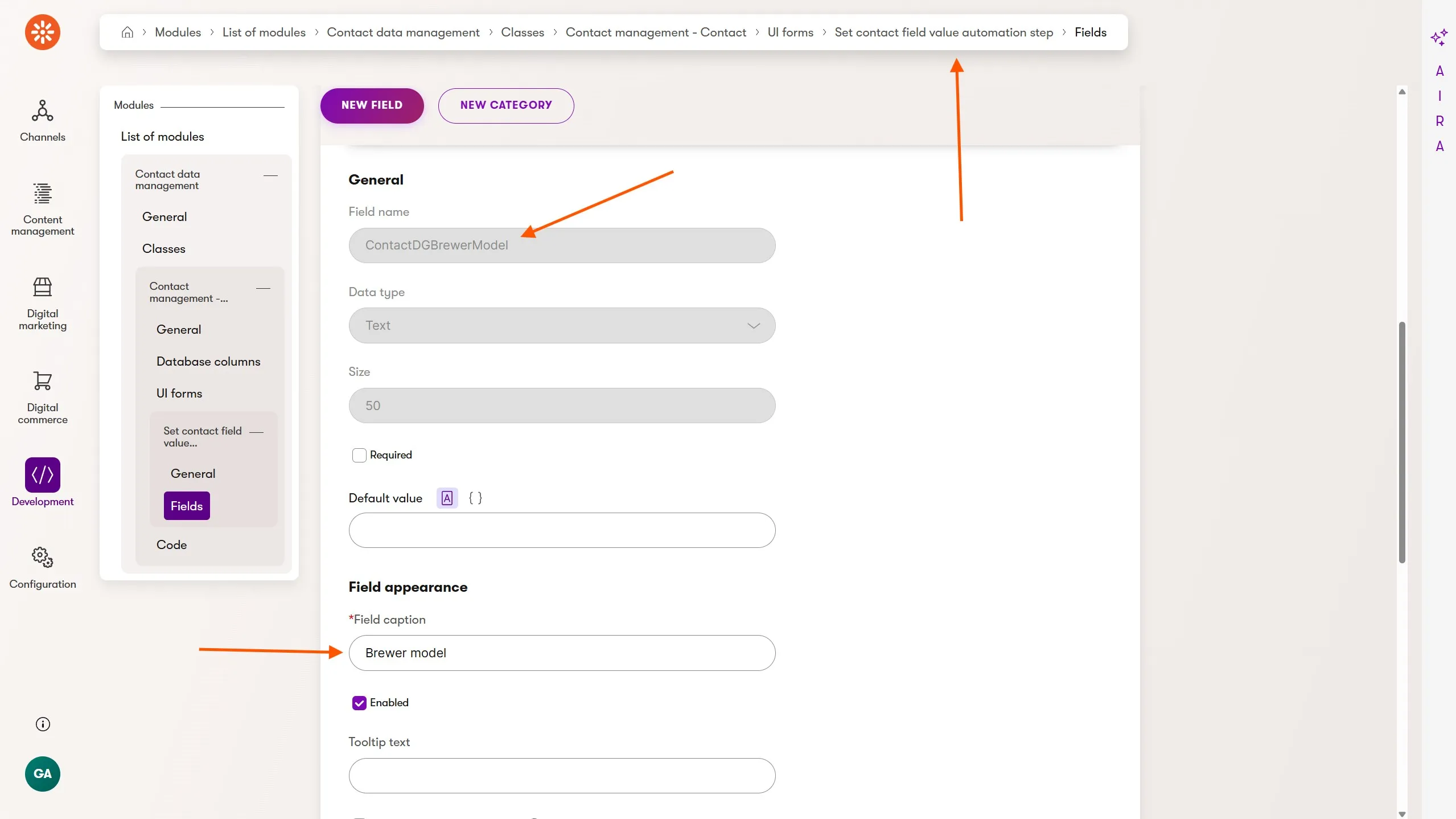
Although the field has been added to the Contact object, it isn't yet visible through Xperience's administration UI. For the ContactDGBrewerModel field to be available in our automation, we also need to add it to the Set contact field value automation step UI form.
Step 2: Build the Brewer Registration form
Using the Form Builder, create a Brewer Registration form with a dropdown populated by the brewer products you want to target.
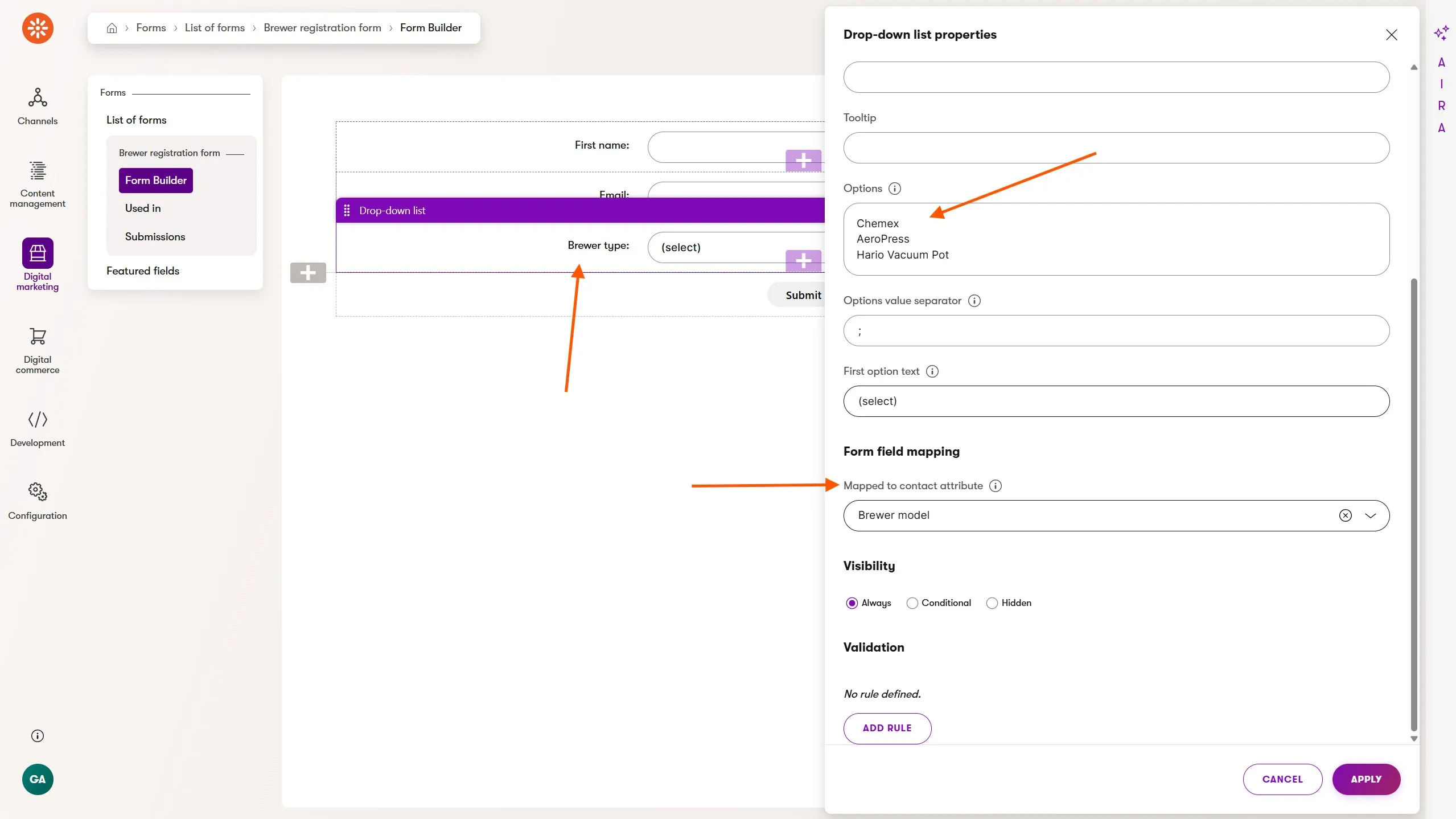
You must map the dropdown field value to the ContactDGBrewerModel contact attribute in the form's field mapping settings. When a customer submits the form, the selected brewer is written directly to the contact record.
Don't skip this step!
Step 3: Add the form to the Order Confirmation page
Using the Page Builder, add the Brewer Registration form to the Order Confirmation page of your checkout process.
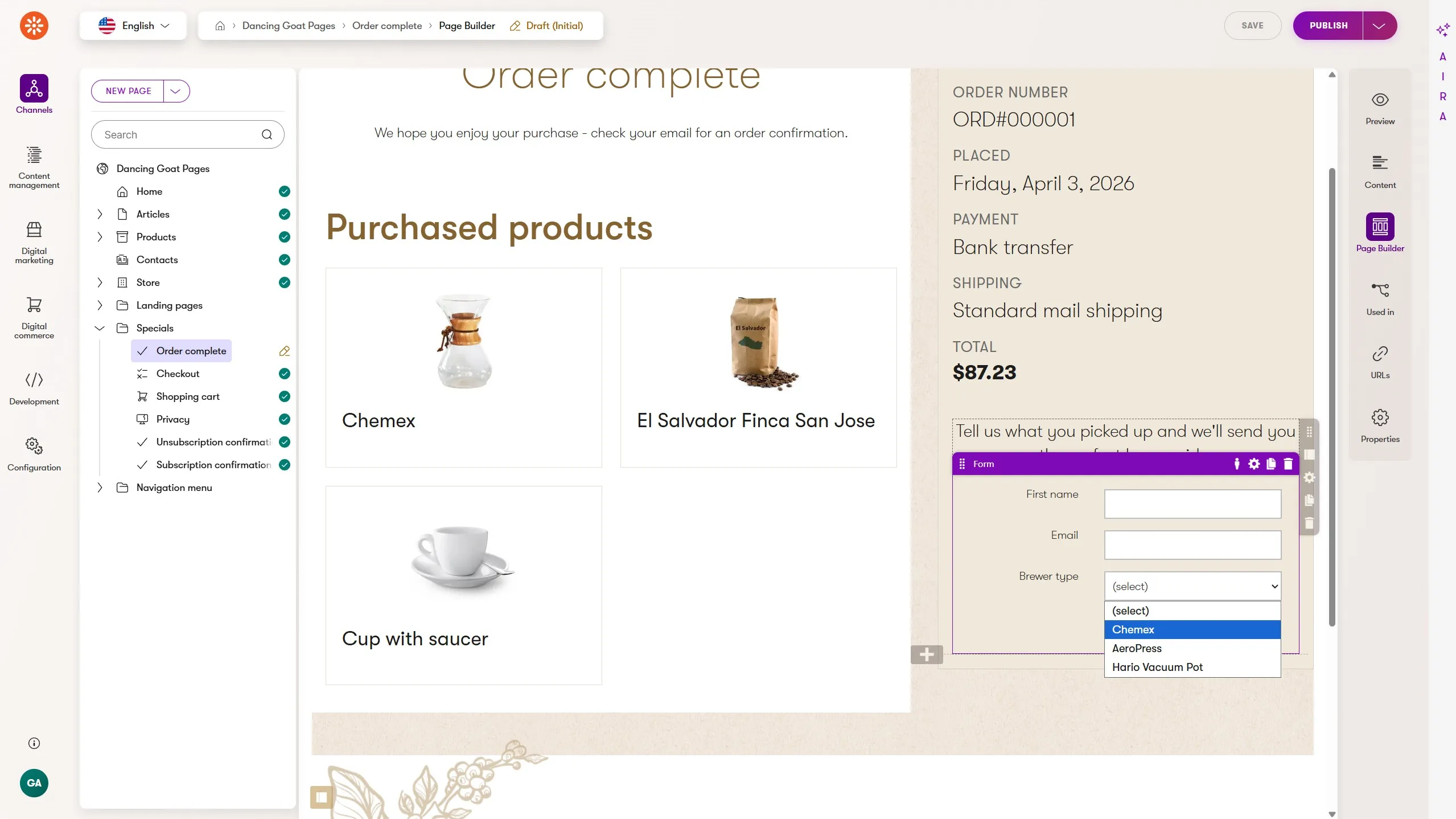
If your checkout process doesn't have an order confirmation page, or the Page Builder isn't enabled for that page, you'll need developer involvement to surface the form at the right moment.
This is a good example of the kind of upfront decision developers can make. They can enable the Page Builder on the types of pages marketers are most interested in, like pages that include key customer engagement points or represent conversions.
This gives marketers more autonomy in scenarios like this without additional developer involvement.
Step 4: Build the automation
Once the form populates the contact field, the automation can branch using the Contact has value in field condition with the contains operator.
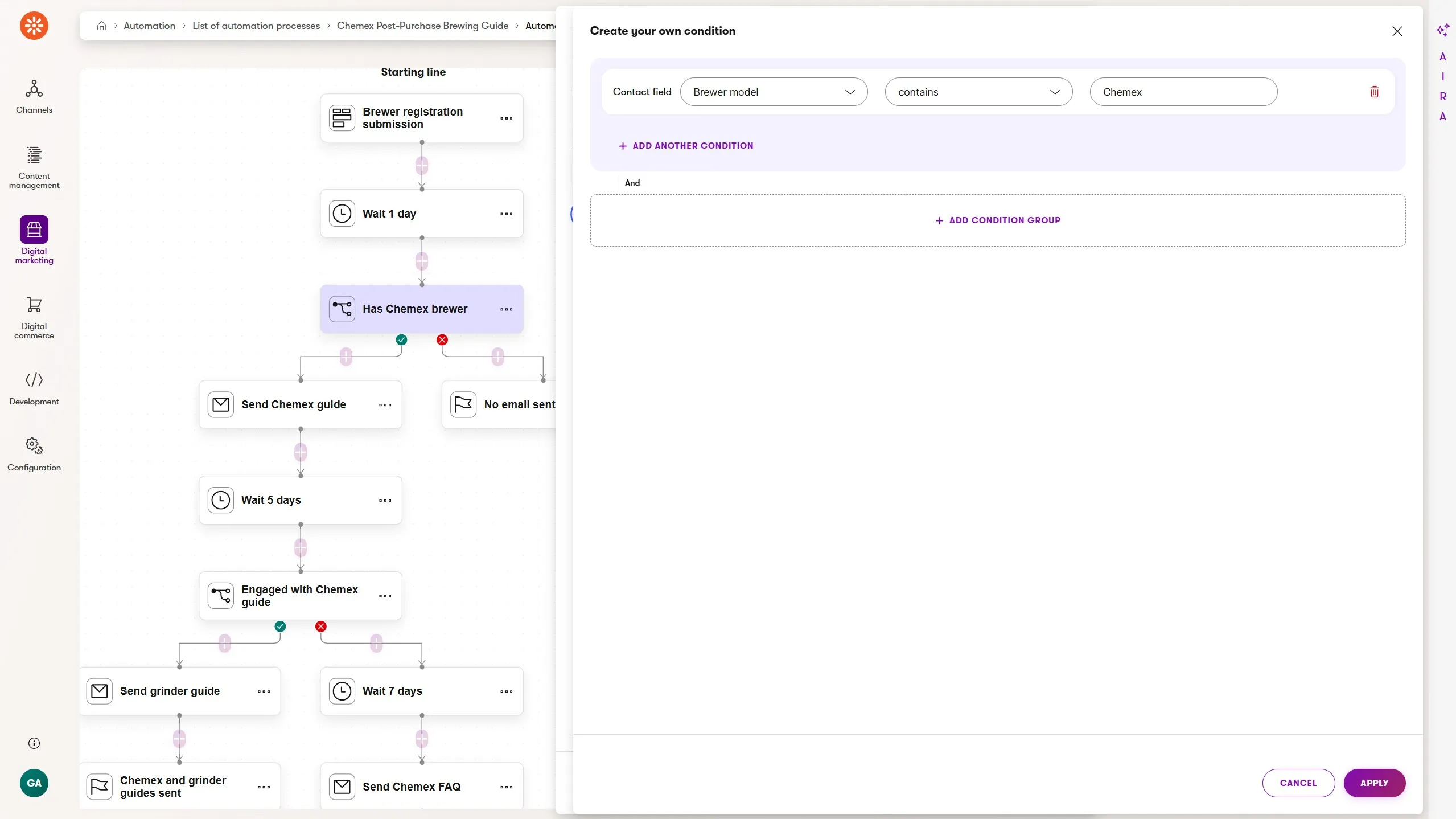
The key steps:
- Form submission trigger - runs when the customer submits the Brewer Registration form on the order confirmation page
- Wait - 1 day, so the first email doesn't compete with transactional order emails
- Condition - does the
Brewer modelcontact field contain"Chemex"? - Send email - the Chemex brew guide: grind size, water temperature, bloom technique, link to the full guide article
- Wait - 5 days to see if they engaged with the guide
- Condition - did they click a link in the guide email?
- Send email - if yes: a grinder recommendation email, nudging toward a complementary purchase. If no: a softer follow-up Chemex FAQ is sent after 7 days to customers who might be struggling quietly
- Finish - each branch ends with a named finish step
Scaling to multiple brewers
The Chemex automation validates the pattern. Once you're confident customers respond to this kind of follow-up, you can extend it to cover your full brewer range.
The contains operator is your friend here. Because the condition checks whether the Brewer model field contains a string rather than exactly matching it, values like "Chemex 6-Cup" will still match a condition checking for "Chemex". This means your dropdown values can be descriptive without breaking the condition logic.
The practical approach is a cascade of condition branches off a single trigger:
Brewer model contains "Chemex"→ Chemex branchBrewer model contains "AeroPress"→ AeroPress branchBrewer model contains "Moka Pot"→ Moka Pot branchBrewer model contains "French Press"→ French Press branch
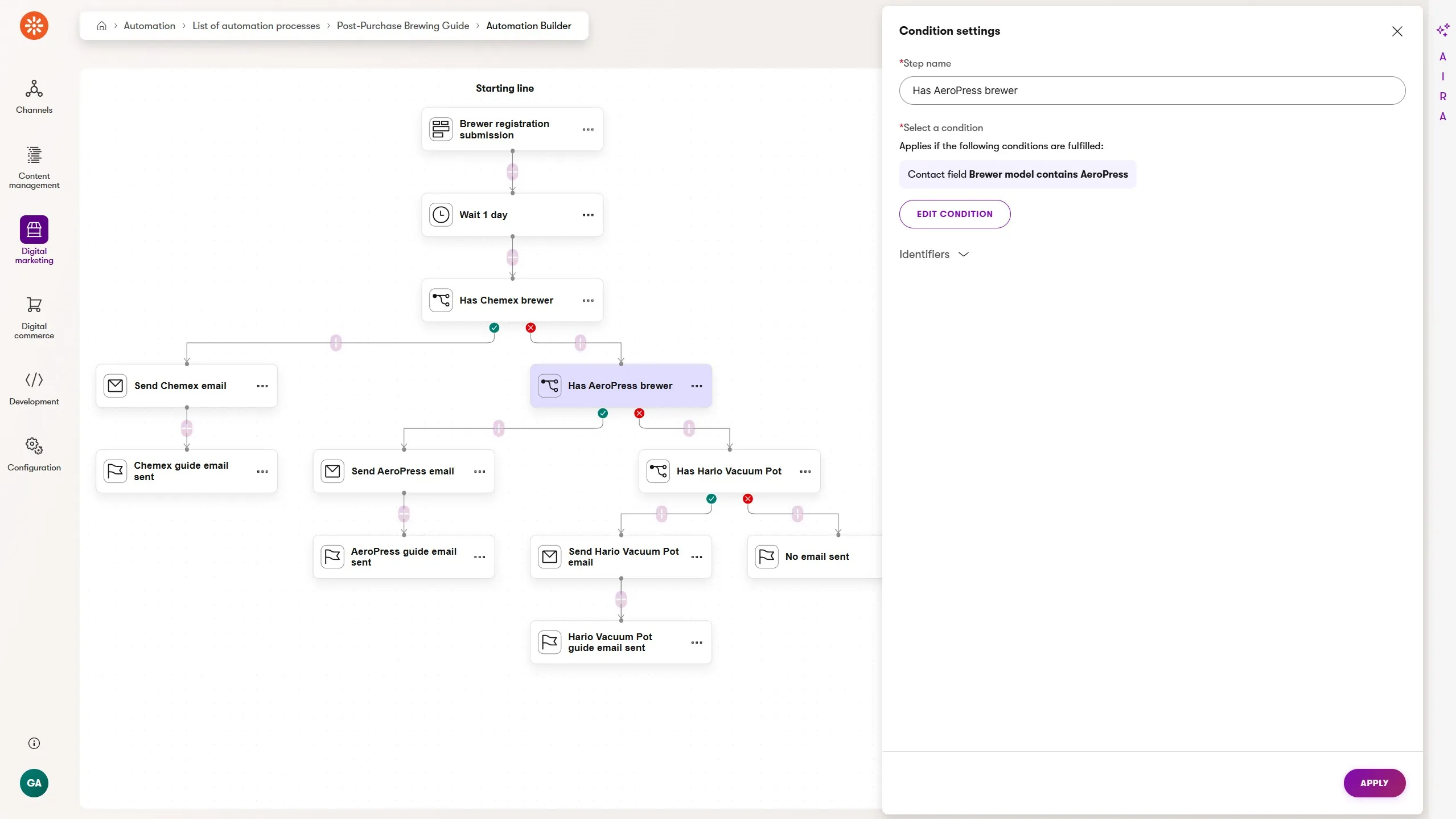
This works, but it gets visually complex quickly and each new brewer means extending the automation.
An alternative is maintaining separate, focused automations per brewer, each triggered by the same form but conditioned independently. That trades builder simplicity for more automations to manage, but keeps each one readable and maintainable. There are best practices for managing a group of automations like this.
Neither approach scales infinitely. If you're supporting a large product range, the right long-term answer involves developer assistance with either a custom activity per product type (triggering dedicated automations) or integration with a CRM or commerce platform that handles product-specific segmentation upstream.
This is covered further in Building a Loyalty Program Automation in Xperience by Kentico, where the developer-marketer division of responsibility is explored in depth.
What to build next
The post-purchase sequence proves that contact data and automation conditions can work together to deliver genuinely personalized experiences.
The next level of complexity uses custom activities to chain multiple automations together. This enables content sequences that respond to real engagement instead of a fixed schedule.
Content drip series: Chaining Automations in Xperience by Kentico: A Multi-Part Content Drip builds directly on the engagement-gating pattern introduced in Step 6 of this automation
Event follow-up: How to Automate Event Registration and Attendance Follow-Up in Xperience by Kentico introduces date-based waits and physical-world activity tracking
Back to the full picture: Xperience Automations: You've Been Meaning to Explore Them. Here's What's Been Waiting

Sean Wright
I'm Lead Product Evangelist and part of the Developer Experience division at Kentico. I work to help our community understand the strategy and value of Xperience by Kentico, with a focus on developers building digital experience solutions. I'm also responsible for Kentico's Community Programs.