It's becoming a theme that my posts here highlight how agentic AI has assisted me in my work with Xperience by Kentico, primarily as a software developer. Using AI allows me to do more (increase my scope) and quickly get valuable updates to users (ship faster).
Let's look at what inspired my most recent AI-assisted project, the Xperience by Kentico Component Registry integration (a "Kentico Labs" integration), how this integration fits in naturally to your Xperience by Kentico development workflow, and what role AI agents played in its development.
Insights drive decisions and decisions drive change
It's important that teams think about consistent and continuous improvements to an Xperience by Kentico project as normal. Of course, to support continuous improvements we need to make that update process as easy as possible.
Sometimes changes are small adjustments or minor bug fixes, but other times they're larger changes to align a solution with a marketing team's goals - like launching a new channel or restructuring content models to drive new messages in customer experiences.
The point is, to move quickly and adapt to the opportunities of tomorrow, teams need to automate and have the right information to make optimization and architecture decisions.
What's the impact of a component update?
When I update "builder" components - Page Builder, Email Builder, Form Builder - I want to know which experiences they'll impact. I can test a new property on a Page Builder widget, but validating one example isn't enough.
What about all the other pages already using that component?
Do all the variations still work correctly?
Is that property designed so that it works well in all the pages that might use it in the future?
Design systems, CSS architecture, and semantic HTML matter, but they're informed by a bigger question - "How and where will this component used?"
Think about how you answer this question and try the integration yourself - it can help you evolve your Xperience by Kentico project safely.
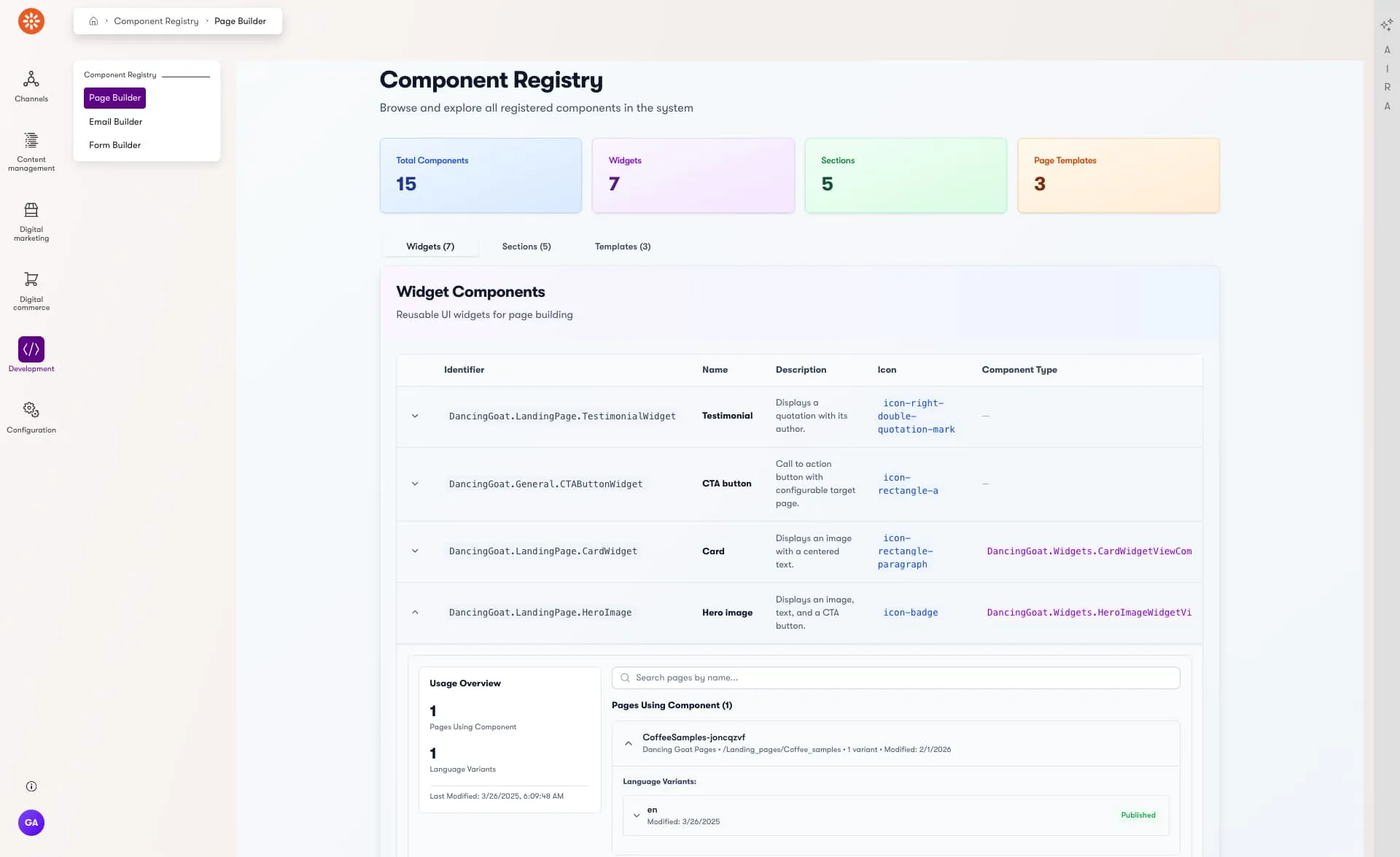
This integration enables administrators and AI agents to view all registered components in an Xperience by Kentico application through a friendly user interface in the Xperience administration or a self-hosted MCP server.
Registration and usage metadata
Thankfully, we can answer that question! Xperience has code and database metadata we can use that tells us everything we need to know - it's just not easily accessible 😅.
C# reflection provides access to this attribute at runtime along with its properties.
Details of where a component is used can be found in various places in the database, including the CMS_ContentItemCommonData table which stores widget and template configuration JSON.
So, we know the data is available, we just have to make it easy to access and understand.
Database architecture
If you are interested in exploring Xperience by Kentico's database architecture, take a look at the following resources:
What I really wanted was an interactive and easy to use visual dashboard, available within Xperience's administration UI.
This would require three key pieces - component registration data, server-side pages and querying, and a rich client-side UI.
I also was purely focused on the Page Builder and its components at this point - Templates, Sections, and Widgets. To prove this idea was possible I limited my scope on the first pass.
I knew I wanted to share this project with others as open-source, so I followed the steps and guidance in our blog post on the topic:
Ever wonder how you can make your first Xperience by Kentico open-source contribution? There's only a few simple steps to get you on your way and some conventions to help other developers have a great experience with your open-source project.
Registration data
Starting with what I noted above, I looked to see how much component registration information was publicly accessible through Xperience's APIs.
Not much! Most APIs are internal, so I used VS Code's C# DevKit to decompile some types. Press F-12 on any C# type to view its decompiled definition.
Decompilation doesn't show the exact source because C# language features and metadata is often compiled away during Release builds, but it is often enough to give you some insights.
Starting with these types and my prompt explaining I wanted to store all this metadata for use elsewhere, the agent built out a collection of types and even the runtime reflection code to transform Xperience's data shape to the one I wanted. It's not exactly what Xperience does, likely lacks some optimizations and edge case handling, but it's good enough!
The AI generated the C# classes and mapping code, plus improvements for data storage and naming conventions.
Server-side pages and client UI
The previous step was small in scope and the C# code wasn't very abstract - each piece clearly connected to the next one.
Administration UI pages can be more complex, especially if an AI agent doesn't have good context about how Xperience's admin UI customization model works - thankfully we have a full documentation section for that and a documentation MCP server.
I still didn't feel completely confident the AI agent would successfully wire-up the server pages with the client components, so I used the tool creator agent to create a new set of reusable instructions to give the agent the right context for these kinds of tasks.
Getting the most out of agentic software development with Xperience by Kentico requires managing your agent's context. Learn how to use GitHub Copilot custom instructions to help you manage that context in your Xperience repository.
I started a new chat to clear the AI context and prepared a prompt for the agent, making sure it had my reusable Xperience-Admin-Custom-Page-and-Layout.instructions.md instructions and the relevant C# types in-context:
Create a custom admin page and layout which will display all the components in the various custom IComponentDefinitionStore instances,
I knew my goal was a good user experience, legibility, and predictable interactions. I heard a lot about shadcn-ui for React and remembered Liam Goldfinch used it for his open-source customization of Xperience by Kentico's administration UI.
This wasn't smooth—GitHub Copilot (Claude Haiku 4.5) struggled with front-end build systems mixing Xperience's client configuration, TailwindCSS, Webpack, and React.
Still, after a few iterations - roughly 30 minutes - the agent resolved the issues.
After playing with the UI, I realized some information wasn't displayed correctly - some was truncated (long component type names) and much wasn't available (channel items, language variants, usage totals). The dashboard only showed a list of components and that component metadata.
Adding page usage metrics
Since I finished the first pass quickly, I had time to experiment with enhancements - I wanted page level data to truly show component usage across the project and I wanted this fetched on-demand, when I clicked on a component metadata row.
I created a quick SQL query to try and gather some example data, and prompted the AI with the next step:
We have implemented the custom component registration and admin pages for this registration
we will now create a new plan to turn the rows of the tables displaying component information into expandable details views which will display the web page information for all web pages of each language that uses each component
the SQL query used to find this data is included.
there is a query to find all pages using the App.Article.Default page template and the App.FeaturedContentWidget widget by identifier
the ContentItemCommonDataVisualBuilderTemplateConfiguration and ContentItemCommonDataVisualBuilderWidgets columns are both JSON columns
the ContentItemCommonDataVisualBuilderTemplateConfiguration looks like this
{
"identifier": "...",
"properties": }
the ContentItemCommonDataVisualBuilderWidgets looks like this
A hierarchical data model to transfer all the page data
A single prompt risked mistakes. Instead, I had the agent generate the prompt, using mine as a starting point, Xperience's documentation, and the existing code.
I reviewed the plan, making sure nothing was clearly incorrect, and then had the agent execute on it. The agent worked for probably 4-5 minutes, generating method stubs, React components, and wiring things up.
Troubleshooting missing context
Once it finished, I ran the build, which succeeded. The functionality, however, was broken:
Undocumented APIs: Although Kentico veterans are familiar with it, the agent wasn't aware that CMS.DataEngine.ConnectionHelper is the simplest solution to run custom SQL queries in Xperience. It was trying, and failing, to use IContentRetriever which didn't expose the data I needed.
Missing context: The data returned by the SQL query had meaning for me, but not the agent. It guessed how the SQL query's relational data result could be correctly mapped to an accurate representation of the data for UI purposes. This required some thinking on my part!
Uncommon APIs: A page's publish status is stored as a numerical value in the database and mapped to CMS.ContentEngine.VersionStatus in code - but this type isn't something developers have to work for normal use cases, which means there aren't many examples of it in Xperience's documentation. The agent guessed the mapping and guessed wrong 🤷.
Once these issues were resolved, I tested the UI. It was full of information, but easy to read and interact with!
I found there were some components used on dozens of pages and the page list was very long, so I asked the agent to introduce a text search box to filter the results which was added in about 15 seconds.
Knowledge and ingenuity
AI helped me experiment faster and taught me new things. But I still defined the problem, set goals, and made decisions based on my knowledge.
AI is my tool. AI helps me do more, even if what I spend most of my time doing isn't typing characters as code. I still need to understand the possibilities, limitations, architecture, and I definitely need to have a problem and goals defined while I experiment and explore.
Don't forget, if you're not learning something new from AI, you're using it wrong.
Let's try emails and forms!
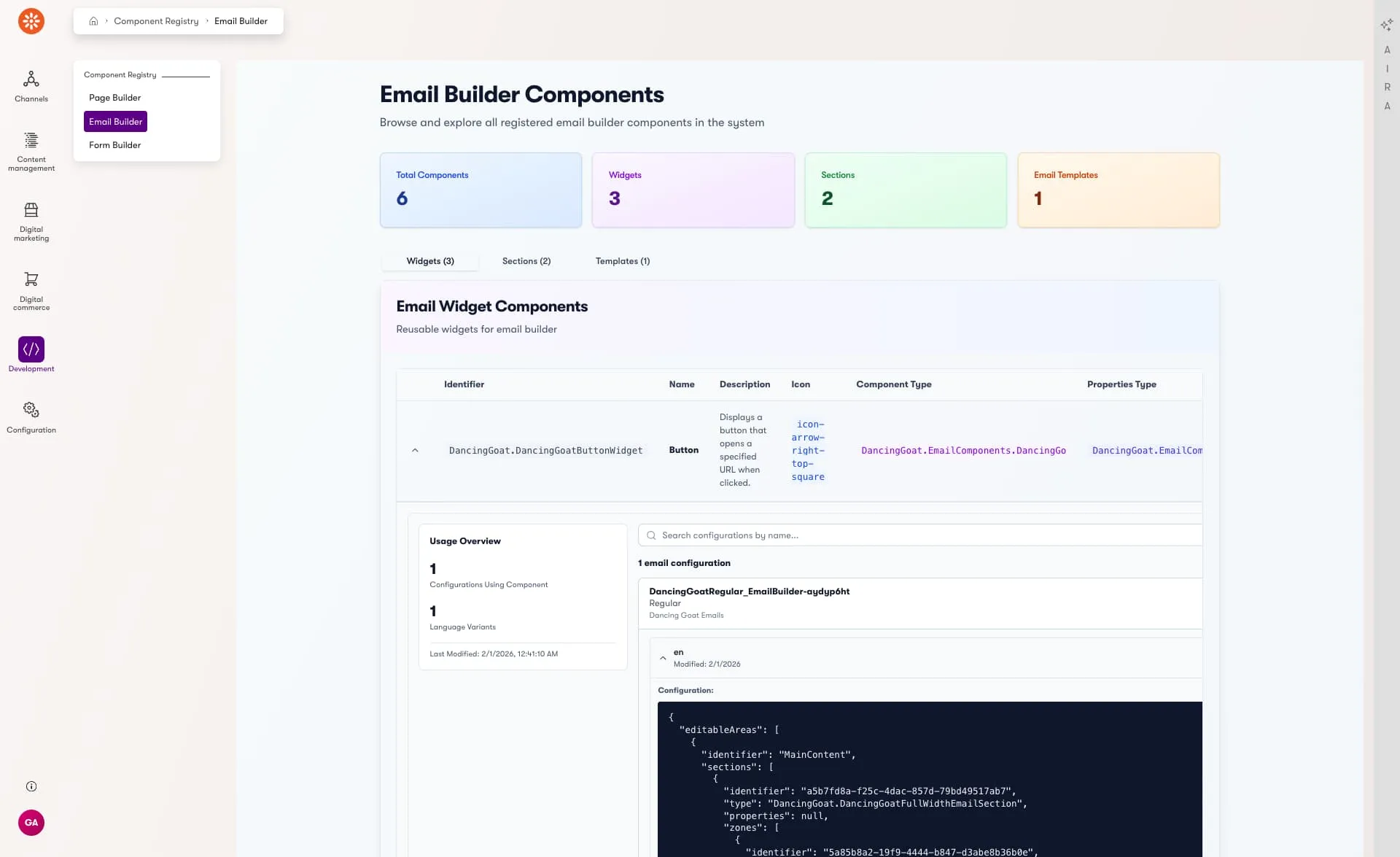
The component registry worked perfectly for Page Builder components, but I didn't have the same visibility for Form Builder and Email Builder components.
AI excels at taking existing patterns and creating variants.
I created final prompt with descriptions of all the pieces the agent would need to create the new registry sections:
Component registration attributes
SQL queries to retrieve component-level usage metrics
Naming conventions to use for each new registry section
The agent already had access to client-server communication patterns, registry services, UI components, and Xperience's server UI page implementations.
Both of these additions were completed without much additional work.
The final result - Xperience by Kentico Component Registry - is available as a NuGet package. Once added to your project you can register its services and see it instantly appear in the Xperience dashboard UI:
The first enhancement I wanted to add to the project was an MCP server so that AI agents could also access all of this helpful data. What could an agent do with component registry metadata?
Use a production backup and identify which widgets are actually in-use or where they are incorrectly used.
Understand the impact of a component modification, like changing a widget property.
Author visual E2E tests of widgets.
Help diagnose widget logic or rendering bugs.
Matching the theme of this post, MCP server support was added to the library with a simple prompt, requesting the same data exposed through the administration UI pages be available to AI agents.
Additional URL support was added to enable agents and administrators to quickly navigate to the usage of a component and validate its rendering or configuration. This scenario is showcased in the video above and the implementation was also driven almost entirely by an AI agent through prompts and some manual testing.
What was the impact of an AI agent?
This wasn't work I'd done before. I didn't know if it was even possible - only that it might be.
This is very different from previous tasks I completed with AI assistance where AI helped me get work done faster or add features that were normally out of scope.
This experiment would've taken weeks in the past. Instead, the initial release only took a couple days to publish and share.
Building the React UI would've taken days; with AI, it took an hour or two. I also learned a lot - like using TailwindCSS in Xperience's administration for custom React components is a viable technology option.
I know you have ideas worth exploring but aren't sure they justify the time investment. Maybe you feel like one part of your experimental project would have a big cost to explore.
Try using AI - it can be a great tool to help turn your dreams into a reality.
You still need to think about the problem, understand the technology you're working with, and diagnose issues when they appear. But, the cost of trying is the smallest it's ever been.
I'm Lead Product Evangelist and part of the Developer Experience division at Kentico. I work to help our community understand the strategy and value of Xperience by Kentico, with a focus on developers building digital experience solutions. I'm also responsible for Kentico's Community Programs.